# Assess an Existing Dataset with Tabular Editor 3 - Step 2: Query DMVs
> This article we examine what are Dynamic Management Views (DMVs) and how to query them from Tabular Editor 3. In the next article, we leverage the DMVs to automate documentation and tasks in our model.
- URL: https://data-goblins.com/dmvs
- Author: Kurt Buhler
- Published: 2022-03-08
- Topic: Tools and automation
# GETTING USEFUL INFORMATION ABOUT YOUR DATASET
*…from dynamic model views, or DMVs, queried with a SQL-like syntax from DAX IDEs*
---
**In this series, we will learn how to effectively assess an existing or ‘inherited’ dataset.**
**We will learn how to…**
- [Remember the person behind the model](https://data-goblins.com/goblin-behind-the-model)
**Conduct an efficient analysis with Tabular Editor 3**
- Analyze the model with [VertiPaq Analyzer](https://www.sqlbi.com/tools/vertipaq-analyzer/)
- **Explore the model with** [**Dynamic Management Views (DMVs)**](https://docs.microsoft.com/en-us/analysis-services/instances/use-dynamic-management-views-dmvs-to-monitor-analysis-services?view=asallproducts-allversions#:~:text=Analysis%20Services%20Dynamic%20Management%20Views,server%20operations%2C%20and%20server%20health.&text=DMV%20queries%20return%20information%20about,%2Dtime%2C%20use%20tracing%20instead.)
- Automate DMVs execution with [C# scripts in Tabular Editor](https://docs.tabulareditor.com/te3/features/csharp-scripts.html)
---
**Before we start, it is assumed that…**
- You have installed [Tabular Editor 3 (TE3)](https://tabulareditor.com/downloads) and [DAX Studio](https://daxstudio.org/downloads/).
- You have downloaded the [VertiPaq Analyzer from sqlbi](https://www.sqlbi.com/tools/vertipaq-analyzer/)
- You have a dataset to analyze
---
## Inheriting a dataset
**Working with a dataset you did not create is challenging.**
There is rarely documentation that gives a good overview of the scope, logic and shortcomings of the dataset, necessitating deep dives into the model itself in order to understand it. This is particularly true when inheriting problem models that you need to “fix”, perhaps plagued by performance issues, inaccurate calculations, or absent functionality. It’s essential to be thorough in these investigations, but at the same time to also be efficient and objective in the analysis.
*In this series, we look at how to handle “model inheritance”, with particular focus on how Tabular Editor 3 makes this very easy & efficient. In this article, we take a brief look at the Dynamic Management Views (DMVs) and how to query them from within Tabular Editor 3.*
## Part 3: Dynamic Management Views (DMVs)
### What are DMVs & why are they useful?
The first thing you should do when getting a new dataset - other than making a back-up - is to analyze it with the [**VertiPaq Analyzer**.](https://data-goblins.com/power-bi/te3-vertipaq) We learned in the previous article that the analyzer gets useful summary statistics about our model using the [**Dynamic Management Views (DMVs)**](https://docs.microsoft.com/en-us/analysis-services/instances/use-dynamic-management-views-dmvs-to-monitor-analysis-services?view=asallproducts-allversions#:~:text=Analysis%20Services%20Dynamic%20Management%20Views,server%20operations%2C%20and%20server%20health.&text=DMV%20queries%20return%20information%20about,%2Dtime%2C%20use%20tracing%20instead.) that exist in every analysis services server and database, including Power BI datasets. They exist to facilitate monitoring & optimization of servers / datasets, and are extremely helpful as a catalog to search for useful things. DMVs can be queried to get aggregate or detailed information, [**not only about the model and its contents, but also about the users connecting to it, and what they are doing**](https://docs.microsoft.com/en-us/analysis-services/instances/use-dynamic-management-views-dmvs-to-monitor-analysis-services?view=asallproducts-allversions#examples-and-scenarios).
If you have a background in SQL Server or have used SSAS/AAS, chances are you are already very familiar with DMVs. I do not, so I’m not going to be going so deep into what the DMVs are and how they work. Although, you may also be somewhat familiar with the DMVs if you used [**DAX Studio**](https://daxstudio.org). DAX Studio is a tool that helps authoring & optimizing DAX code, where you can run DAX queries on your model. Using the same query windows, you can also query these DMVs. DMVs have a limited SQL-like syntax where you use simple SELECT statements to get what you need.
Get all measures, with expressions & properties
[SELECT * FROM $SYSTEM.TMSCHEMA_MEASURES](https://docs.microsoft.com/en-us/openspecs/sql_server_protocols/ms-ssas-t/960d4f92-49e9-4231-a39f-c7048e4ea63d)
or (less preferable)
SELECT * FROM $SYSTEM.MDSCHEMA_MEASURES
Get all calculation items, with expressions & properties
[SELECT * FROM $SYSTEM.TMSCHEMA_CALCULATION_ITEMS](https://docs.microsoft.com/en-us/openspecs/sql_server_protocols/ms-ssas-t/e5f9af60-a748-4f93-91e5-7635b2e25811)
Get all Power Query M code, with properties
**Partitions - Data loaded in-memory:**
[SELECT * FROM $SYSTEM.TMSCHEMA_PARTITIONS](https://docs.microsoft.com/en-us/openspecs/sql_server_protocols/ms-ssas-t/c8fae079-ad92-47ab-b0eb-b78ea8db284c)
**Expressions - Not loaded in model (i.e. parameters)**
[SELECT * FROM $SYSTEM.TMSCHEMA_EXPRESSIONS](https://docs.microsoft.com/en-us/openspecs/sql_server_protocols/ms-ssas-t/ca94b8c6-b63b-432f-b79d-d2f776a71873)
Get all tables with RI Violations
**Return all tables:**
[SELECT * FROM $SYSTEM.DISCOVER_STORAGE_TABLES WHERE RIVIOLATION_COUNT > 0](https://docs.microsoft.com/en-us/openspecs/sql_server_protocols/ms-ssas/eae69b5d-bd76-42d2-8429-665bf08d2cf0)
Get Extended Properties (i.e. TE deployment metadata)
*(Content not available)*
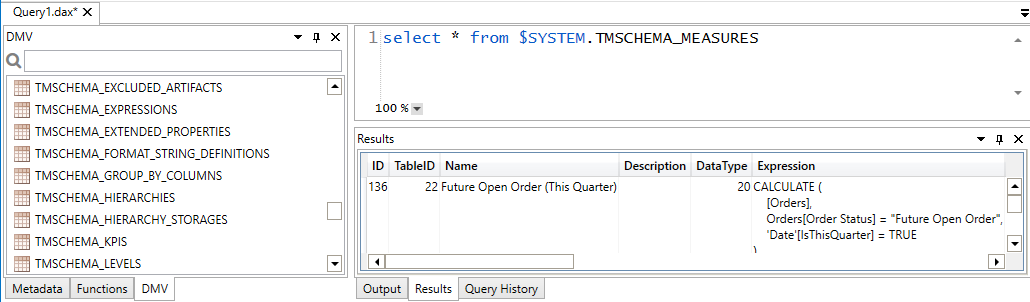
DAX Studio provides a library of the DMVs as a tab on the left navigation menu. If you double-click on one, you will see an example query appearing, for example for the TMSCHEMA_MEASURES DMV:
Result of the TMSCHEMA_MEASURES DMV
This information can be output in DAX studio to a .csv or Excel file that you can use for documentation, or to maintain a ‘master list’ of measures.
### In Tabular Editor 3, you can also query DMVs
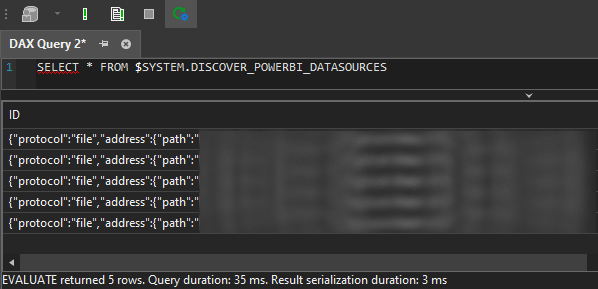
These DMVs can not only be queried from DAX Studio, but also Tabular Editor 3 with the ‘DAX Query’ window. Mind, that as of version 3.2.2, the SQL-like syntax to query the DMVs will not be recognized by the code-assist features in TE3, which will pick it up as a ‘DAX Error’.
Querying a DMV from Tabular Editor 3’s DAX Query UI to get the Power BI data sources
### What kinds of information can you get?
There’s a lot that you can do with the DMVs. This information is very valuable for documentation, and used by a lot of tools. However, querying the DMVs is a manual task that costs time to execute and manage. While useful, there are now more efficient ways to find or handle most of this information (i.e. VertiPaq Analyzer, Tabular Editor). However, we can actually use these DMVs to extend the functionality of existing tools - for example to automatically tell us certain statistics upon a condition, or when we trigger a C# script (or macro).
In all, the DMVs available from the $System schema come in 4 flavours:
- **DISCOVER method:** Requires admin privileges; returns information about model but also connected sessions.
- **DMSCHEMA:** Data-mining (DM); not used as often in Power BI, but usually in SSAS/AAS
- **MDSCHEMA:** Multi-dimensional (MD); provides information from the model how it is understood from MDX (XML information).
- **TMSCHEMA:** Tabular model (TM); provides information from the tabular model (TMSL information).
Some DMVs may fail if you do not have the appropriate permissions
### Example use-cases for DMVs
Click below and copy the SELECT statements into a DAX query window, in TE3 or DAX Studio
[SELECT * FROM $SYSTEM.TMSCHEMA_MEASURES](https://docs.microsoft.com/en-us/openspecs/sql_server_protocols/ms-ssas-t/960d4f92-49e9-4231-a39f-c7048e4ea63d)
or (less preferable)
SELECT * FROM $SYSTEM.MDSCHEMA_MEASURES
[SELECT * FROM $SYSTEM.TMSCHEMA_CALCULATION_ITEMS](https://docs.microsoft.com/en-us/openspecs/sql_server_protocols/ms-ssas-t/e5f9af60-a748-4f93-91e5-7635b2e25811)
**Partitions - Data loaded in-memory:**
[SELECT * FROM $SYSTEM.TMSCHEMA_PARTITIONS](https://docs.microsoft.com/en-us/openspecs/sql_server_protocols/ms-ssas-t/c8fae079-ad92-47ab-b0eb-b78ea8db284c)
**Expressions - Not loaded in model (i.e. parameters)**
[SELECT * FROM $SYSTEM.TMSCHEMA_EXPRESSIONS](https://docs.microsoft.com/en-us/openspecs/sql_server_protocols/ms-ssas-t/ca94b8c6-b63b-432f-b79d-d2f776a71873)
**Return all tables:**
[SELECT * FROM $SYSTEM.DISCOVER_STORAGE_TABLES WHERE RIVIOLATION_COUNT > 0](https://docs.microsoft.com/en-us/openspecs/sql_server_protocols/ms-ssas/eae69b5d-bd76-42d2-8429-665bf08d2cf0)
SELECT * FROM $SYSTEM.TMSCHEMA_EXTENDED_PROPERTIES
*For Tabular Editor, this lets you see information like:*
- *The user who deployed (their local machine ID)*
- *The time of deployment*
- *The client machine*
- *Deployment mode*
- *TE version #*
SELECT * FROM $SYSTEM.TMSCHEMA_REFRESH_POLICIES
*This is more efficiently done from the VertiPaq Analyzer.
**Columns - Basic Info & Properties:**
SELECT * FROM $SYSTEM.TMSCHEMA_COLUMNS
**Columns - Further info (statistics, storage/encoding info, usage):**
SELECT * FROM $SYSTEM.TMSCHEMA_TABLES
SELECT * FROM $SYSTEM.DISCOVER_POWERBI_DATASOURCES
SELECT * FROM $SYSTEM.DISCOVER_CALC_DEPENDENCY
---
## FURTHER READING
- [**Marco Russo:** Last Process Date in SSAS Tabular](https://www.sqlbi.com/articles/last-process-date-in-ssas-tabular/)
- [**Meagan Longoria:** Documenting your Tabular or Power BI Model](https://datasavvy.me/2016/10/04/documenting-your-tabular-or-power-bi-model/)
- [**Darren Gosbell:** The easy way to Generate a DAX query for all measures](https://darren.gosbell.com/2020/08/the-easy-way-to-generate-a-dax-query-for-all-measures/)
- [**Chris Webb:** Extracting All The M Code From A Power BI Dataset Using The DISCOVER_M_EXPRESSIONS DMV](https://blog.crossjoin.co.uk/2019/05/08/extract-m-code-dmv/)
[**Chris Webb:** Creating Excel “Data Dump” Reports from Power BI](https://blog.crossjoin.co.uk/2018/02/05/creating-excel-data-dump-reports-from-power-bi/)
*Using this method, you can enter the DMV query and have documentation that automatically updates whenever you refresh the query in Excel.*
---
## DMVs: Query with SQL-like syntax for useful metadata
- DMVs return data / metadata to help monitor, document & optimize a server / database, not only about the model, but in some cases, about the users & active sessions connected to it.
- Some DMVs require admin privileges (TMSCHEMA, DISCOVER method)
- Querying DMVs is handy for getting an extract of specific things for documentation purposes, though many tools have exploited this to make it easier or even automated.
- We can extend & exploit the DMVs in tools like Tabular Editor 3 to give us convenient information on-demand, or to alert us when certain things arise in our model.
---
## NEXT UP: EXTEND DMVs WITH MACROS IN TABULAR EDITOR
In the next article of this series, we exploit these DMVs ourselves in C# scripts & macros of TE3, to **automate detection of data issues while we work**. This is an extremely powerful aspect of the tool, combining these methods and everything we’ve learned so far to empower us to save time and make better models — this is the power of Tabular Editor 3.
[](https://data-goblins.com/te-dmv-scripts)
Click here for the next article in the series
---
 **Working with a dataset you did not create is challenging.**
There is rarely documentation that gives a good overview of the scope, logic and shortcomings of the dataset, necessitating deep dives into the model itself in order to understand it. This is particularly true when inheriting problem models that you need to “fix”, perhaps plagued by performance issues, inaccurate calculations, or absent functionality. It’s essential to be thorough in these investigations, but at the same time to also be efficient and objective in the analysis.
*In this series, we look at how to handle “model inheritance”, with particular focus on how Tabular Editor 3 makes this very easy & efficient. In this article, we take a brief look at the Dynamic Management Views (DMVs) and how to query them from within Tabular Editor 3.*
## Part 3: Dynamic Management Views (DMVs)
### What are DMVs & why are they useful?
The first thing you should do when getting a new dataset - other than making a back-up - is to analyze it with the [**VertiPaq Analyzer**.](https://data-goblins.com/power-bi/te3-vertipaq) We learned in the previous article that the analyzer gets useful summary statistics about our model using the [**Dynamic Management Views (DMVs)**](https://docs.microsoft.com/en-us/analysis-services/instances/use-dynamic-management-views-dmvs-to-monitor-analysis-services?view=asallproducts-allversions#:~:text=Analysis%20Services%20Dynamic%20Management%20Views,server%20operations%2C%20and%20server%20health.&text=DMV%20queries%20return%20information%20about,%2Dtime%2C%20use%20tracing%20instead.) that exist in every analysis services server and database, including Power BI datasets. They exist to facilitate monitoring & optimization of servers / datasets, and are extremely helpful as a catalog to search for useful things. DMVs can be queried to get aggregate or detailed information, [**not only about the model and its contents, but also about the users connecting to it, and what they are doing**](https://docs.microsoft.com/en-us/analysis-services/instances/use-dynamic-management-views-dmvs-to-monitor-analysis-services?view=asallproducts-allversions#examples-and-scenarios).
If you have a background in SQL Server or have used SSAS/AAS, chances are you are already very familiar with DMVs. I do not, so I’m not going to be going so deep into what the DMVs are and how they work. Although, you may also be somewhat familiar with the DMVs if you used [**DAX Studio**](https://daxstudio.org). DAX Studio is a tool that helps authoring & optimizing DAX code, where you can run DAX queries on your model. Using the same query windows, you can also query these DMVs. DMVs have a limited SQL-like syntax where you use simple SELECT statements to get what you need.